YouGooDai
Mobile of the Day

YouGooDai

5.0 FREE
  • Screenshot 1
  • Screenshot 2
  • Screenshot 3

Description

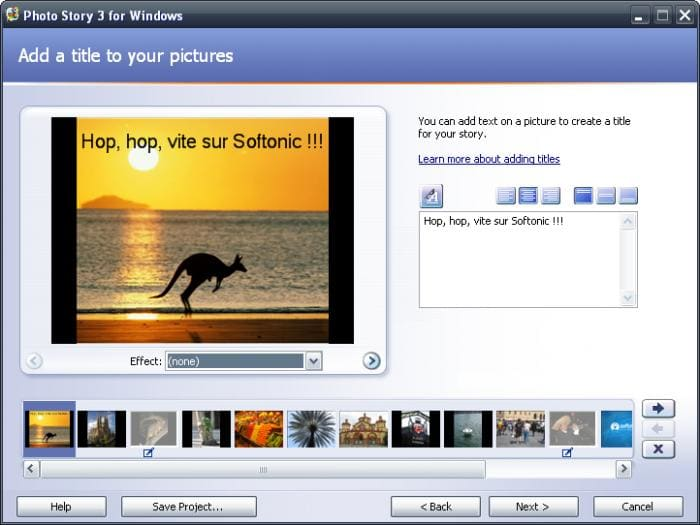
About Photo Story 3 for WindowsPhoto Story 3 for Windows is a user-friendly and creative software that allows you to bring your digital photos to life. With its intuitive features, you can easily create captivating photo slideshows of your most memorable moments. Enhance your images with a single click, add stunning special effects, soundtracks, and personalize your stories with titles and captions. The compact file size makes it simple to share your photo stories via email or on a Windows Mobile-based portable device. Key Feature 1: Easy Photo Editing Photo Story 3 for Windows makes it incredibly easy to touch-up, crop, or rotate your pictures with just a single click. This intuitive feature ensures that your photos look their best, allowing you to showcase your memories in the most appealing way. 2: Stunning Special Effects Enhance your photo slideshows with a variety of stunning special effects available in Photo Story 3. These effects add a professional touch to your stories, making them even more captivating and engaging for your audience. 3: Personalized Soundtracks and Captions Photo Story 3 allows you to personalize your stories with custom soundtracks and captions, adding depth and emotion to your slideshows. By incorporating your choice of music and text, you can create a unique and meaningful narrative for your most cherished memories. 4: Easy Sharing Options The software's compact file size makes it simple to share your photo stories via email or on a Windows Mobile-based portable device. This convenience ensures that you can easily share your stories with friends and family, allowing them to enjoy your memorable moments wherever they may be. 5: User-Friendly Interface Photo Story 3 for Windows features a user-friendly interface that makes creating photo slideshows a breeze. The software is designed to be accessible to users of all skill levels, ensuring that anyone can create stunning and captivating photo stories with ease. In conclusion, Photo Story 3 for Windows is an innovative and easy-to-use software that brings your digital photos to life in the form of captivating slideshows. With its user-friendly photo editing tools, stunning special effects, personalized soundtracks and captions, and convenient sharing options, Photo Story 3 allows you to create and share your life's most memorable moments in a unique and engaging way. Start sharing your stories today with Photo Story 3 for Windows.Reviewed by Paula L. WhiteShow MoreShow Less

Guides & Tutorials for Photo Story 3 for Windows

How to install Photo Story 3 for Windows
  1. Click the Preview / Download button above.
  2. Once redirected, accept the terms and click Install.
  3. Wait for the Photo Story 3 for Windows download to finish on your device.
How to use Photo Story 3 for Windows

This software is primarily used for its core features described above. Open the app after installation to explore its capabilities.

User Reviews for Photo Story 3 for Windows 0

    No reviews found

Similar Apps
